Apps & Tech
Best Dive Computer Apps for Apple Watch Ultra
The Apple Watch Ultra is a capable dive computer once you add the right app. Here are the apps that turn it into one in 2026, compared honestly on price, features and sea conditions.
The Apple Watch Ultra only becomes a dive computer when you add an app. In 2026 the main choices are Oceanic+ (the most polished, a paid subscription, no sea conditions), DIVEROUT (paid, with AI photo and video color correction), Mares (Apple-Watch only, no iPhone app), and Diving Standard (free, with the widest tool set plus live sea conditions). All use the Bühlmann ZH-L16C algorithm; they differ mostly on price, breadth and whether they show sea conditions.
- Most polished
- Oceanic+ (subscription)
- Best for media
- DIVEROUT (AI color)
- Free + most tools
- Diving Standard
- Algorithm
- Bühlmann ZH-L16C + GF
Out of the box, the Apple Watch Ultra is rated to 100 m but is not a dive computer. An app makes it one. The good news is that the serious options all run the same well-understood decompression model, so the real differences come down to price, how much they do beyond the dive itself, and whether they tell you anything about the water you are about to get into.
The apps, head to head
Oceanic+
Best for: The most refined dive-computer experience
Made by the Oceanic dive brand, this is the app that launched the category. The UI is calm, clear and confidence-inspiring underwater. The trade-offs: it is a paid subscription, it caps at 40 m, and it shows no weather or sea conditions.
DIVEROUT
Best for: Divers who film and shoot
A solid dive computer with a real differentiator: one-tap AI color correction for underwater photos and video, plus AI tank-pressure prediction that learns your gas use. Paid, a workable UI, and no live sea conditions.
Mares
Best for: Mares-ecosystem divers
Brings Mares to the Apple Watch Ultra with the Bühlmann algorithm, a compass, logbook and GPS entry and exit points. The catch: it runs on the watch without a companion iPhone app, which limits review and planning on your phone.
Diving Standard
Best for: The most tools, for free, with sea conditions
A free dive computer for the Ultra (depth sensor and all) plus a transparent gradient-factor algorithm, a 16-tissue heatmap, nitrox, CNS tracking, an ascent-rate gauge, customisable watch screens, and live sea conditions for any site. The broadest feature set here. Full breakdown: Oceanic+ vs Diving Standard.
Diving Standard is our own app, so treat this as informed but interested. We have kept the facts about the other apps accurate and fair; check current pricing on the App Store before you subscribe.
How they compare at a glance
| Oceanic+ | DIVEROUT | Diving Standard | |
|---|---|---|---|
| Price | Subscription | Paid | Free |
| Algorithm | Bühlmann ZH-L16C | Bühlmann ZH-L16C | Bühlmann ZH-L16C + GF |
| Live sea conditions | No | No | Yes |
| AI photo / video | No | Yes | No |
| Nitrox | Yes | Yes | Yes |
| iPhone companion | Yes | Yes | Yes |
What the sea conditions card actually shows
This is the part no dive computer does, because a dive computer starts working once you are already in the water. The question before that one is whether to get in at all, and until now the honest answer was a surf forecast in another app that knows nothing about diving.
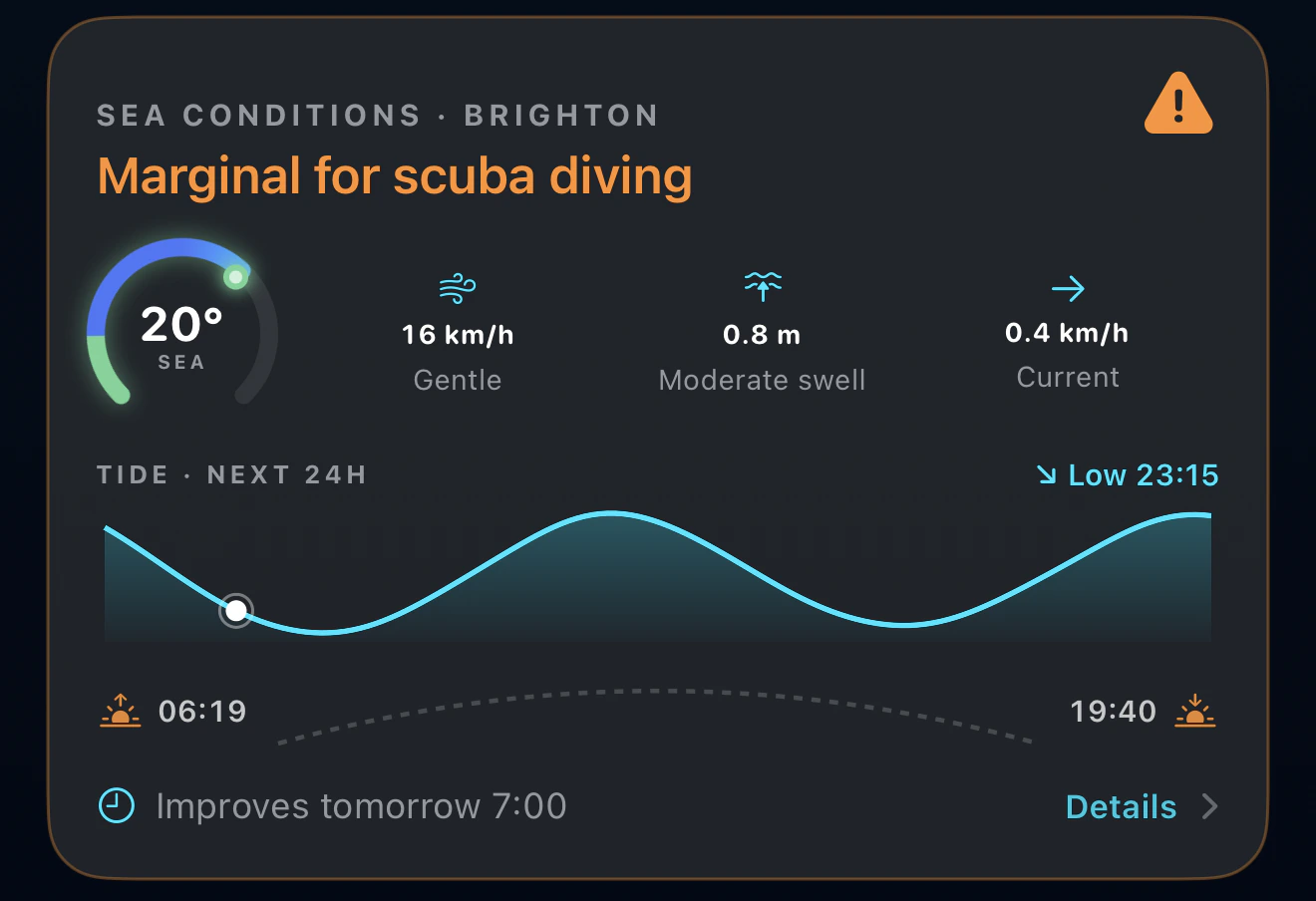
Sea temperature decides what you wear, so it leads. Wind, swell and current decide whether the entry is sane. The tide curve runs from three hours behind you to twenty-one ahead, which is the window you are actually planning inside, and the sunrise and sunset line is there because the light is what ends the day rather than the tide. When the verdict is off, the card says when it improves rather than stopping at no.
And the rest of what comes with it
The sea conditions card is the one that gets used daily, but it is not the reason the app is bigger than the others. These are:
- Dive sites. Real sites with depths, marine life and what other divers logged there, so planning a dive somewhere new starts with something better than a search engine.
- Shareable dive cards. A logged dive becomes a card worth posting, with the depth profile, the site and your photos on it. Your logbook stops being a spreadsheet only you read.
- A local and a world community. A map of sea lovers near you, and the same map at planet scale for the trip you are planning. Both are opt-in, and locations are fuzzed by about a kilometre.
- Certification cards in Apple Wallet. Your qualifications on the lock screen, which is where they are useful, rather than in a drawer at home when the dive centre asks.
- Free courses. Scuba, freediving and snorkelling theory written for divers who want to know why, not a quiz you click through.
What actually separates them
- Price over a year. Oceanic+ and DIVEROUT are paid; Diving Standard is free. Over a season of diving that gap is real money for the same core job.
- Sea conditions. A dive computer tells you about the dive you are on. None of the paid apps tell you whether to get in. Diving Standard adds tide, current, water temperature, UV, wind and visibility for the site.
- Media. If you shoot underwater, DIVEROUT's AI color correction is a genuine, time-saving feature the others do not have.
- Transparency. Look for clear gradient-factor settings so you know how conservative your computer is. Diving Standard exposes this and visualises tissue loading; not every app does.
- Polish. Oceanic+ remains the most refined feel underwater. If a calm, proven interface matters most to you, it earns its subscription.
Turn your Apple Watch Ultra into a dive computer, free
Depth, NDL, ascent-rate alerts, nitrox, a tissue heatmap, customisable screens and live sea conditions. Download Diving Standard free.
Download on the App StoreFrequently asked questions
What is the best dive computer app for Apple Watch Ultra?
It depends on your priorities. Oceanic+ is the most polished and proven, as a paid subscription. Diving Standard is free and offers the widest tool set plus live sea conditions. DIVEROUT is best if you want AI color correction for underwater photos and video. All use the Bühlmann ZH-L16C algorithm, so the difference is mostly price, breadth and sea conditions rather than core safety maths.
Is the Apple Watch Ultra a good dive computer?
With the right app it is a capable recreational dive computer: it tracks depth, no-decompression limits, ascent rate and safety stops, and the Ultra's depth sensor is purpose-built for it. It is designed for recreational diving to around 40 m, not technical or decompression diving, and as with any single computer, many divers carry a backup.
Do I have to pay for a dive computer app on Apple Watch?
No. Oceanic+ and DIVEROUT are paid, but Diving Standard provides a full Apple Watch dive computer for free, including nitrox, ascent-rate alerts, a tissue heatmap and live sea conditions. You can run the Ultra as a dive computer without an ongoing subscription.
Which apps show weather and sea conditions?
Among the dedicated dive-computer apps, Diving Standard is the one that adds live sea conditions, tide, current, water temperature, UV, wind and visibility, for the site you are diving. Oceanic+, DIVEROUT and Mares focus on the dive itself and do not show sea conditions.