Underwater Photography
The Best Camera App for the iPhone 18 Pro Max
You paid for the best camera Apple has ever made, and its own app still won't let you set ISO. Here's what each alternative unlocks, and which one suits the way you shoot.
If you want full manual control without learning a new camera, the best app for the iPhone 18 Pro Max is one that adds manual ISO and keeps Apple's layout. Apple's Pro Controls now let you set aperture and shutter speed (1/16000 s to 1 s), but ISO always sets itself. Diving Standard's camera looks and works like the one you know, then adds manual ISO, shutter speeds from 1/70000 s to 8 s, 48 MP RAW, open gate video and colour that's corrected for water. It's free. Halide and ProCamera are the best paid options if you only shoot on land.
- Manual ISO
- Diving Standard, Halide, ProCamera
- Fastest shutter
- 1/70000 s (Apple: 1/16000 s)
- Longest exposure
- 8 s stacked (Apple: 1 s)
- Familiar layout
- Diving Standard
The iPhone 18 Pro Max has a variable aperture, a 48 MP main sensor and a chip fast enough to grade 4K on a train. When Apple added Pro Controls to the Camera app, it finally felt like the phone was being treated as a real camera. Then you set a shutter speed, and ISO quietly sets itself.
That's the gap every camera app on this list is trying to close. The hardware can do more than Apple's software lets it. If you've spent the money on the phone, it's fair to want all of it.
What Apple's Camera app gives you now
Pro Controls work in photo and video. You can set the aperture (four steps on the main camera, from f/1.48 to f/4), the shutter speed from 1/16000 s to one second, and white balance, with a live histogram to check your exposure. It's clean, quick and good enough for most people most of the time.
What it won't do is let you choose ISO. As Tom's Guide put it, when you fix aperture and shutter, ISO moves to make up the difference. You get a brighter picture, and the noise that comes with it, whether you wanted it or not.
The camera apps worth installing
Diving Standard camera
Best for: Full manual control in a layout you already know, free
It looks and works like Apple's camera, so there's nothing to relearn. Underneath you get manual ISO, shutter speeds from 1/70000 s to 1 s as single exposures and 2 to 8 s stacked, manual aperture on the variable lens, 48 MP RAW, 4K, ProRes, Log and open gate video. Shoot anywhere near water and it also corrects the colour live in the viewfinder.
Halide
Best for: Clean RAW and a photographer's interface
The favourite of iPhone photographers who want RAW without Apple's processing. Excellent focus tools and a polished interface of its own. Paid, with no tools for underwater colour.
ProCamera
Best for: Priority modes and deep settings
A long-running manual camera with shutter and ISO priority, white balance and ProRAW. Paid, and there's a lot to learn.
ProShot
Best for: DSLR-style controls for photo and video
Manual exposure, white balance and focus, laid out like a dedicated camera. Paid.
Diving Standard is our app, so weigh this accordingly. We've described the others by what they actually do; check the App Store for current prices.
Why the extremes matter
The 18 Pro Max sensor reports a fastest exposure of about 1/71429 s. Apple's app stops at 1/16000 s, a little over two stops short. At the other end it stops at one second. Our camera goes to 1/70000 s, and past one second it stacks exact one-second frames up to 8 seconds.
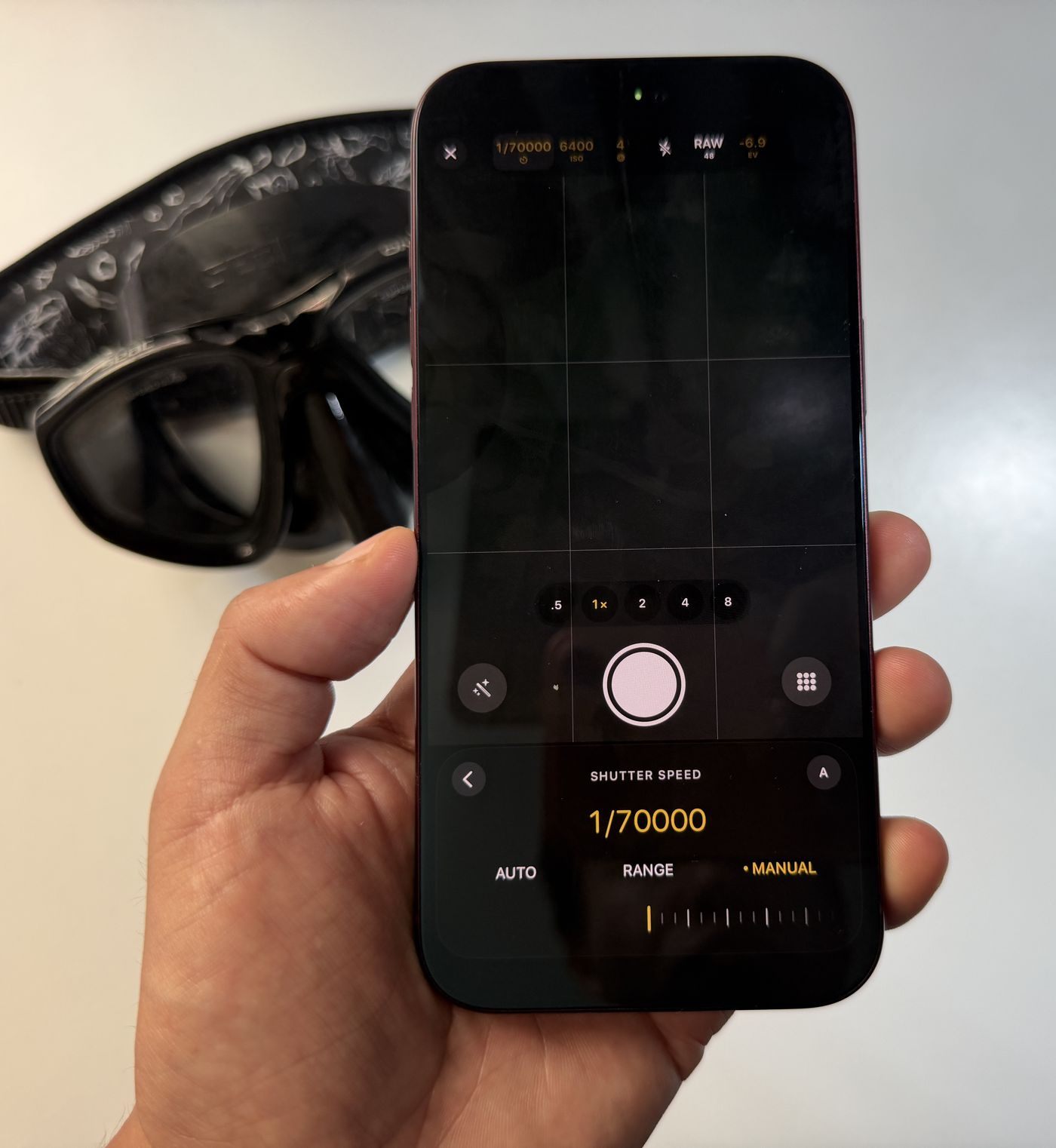
- At the fast end, you can shoot wide open at f/1.48 on a bright beach without blowing out the sky, freeze spray off a breaking wave, or stop a fish mid-turn.
- At the slow end, two to eight seconds turns moving water to mist and traffic to ribbons. Put the phone on a tripod: anything from one second up needs it perfectly still. More in long exposure on the iPhone 18 Pro Max.
- ISO in between. Pick the lowest ISO the light allows and lock it. On a phone's small sensor, that's one of the easiest ways to get a cleaner file. We explain why in the iPhone 18 Pro Max has no manual ISO.
If you shoot anywhere near the sea
Phones assume you're standing on land. Underwater, or even through a few metres of clear water when you snorkel, that assumption breaks: auto white balance reads the blue as the scene's true colour and you come home with flat, cyan pictures. Our camera uses white balance tuned for water, with presets by depth, and its True Colour correction shows you the fixed picture in the viewfinder while you frame it.
Which one should you pick?
- You want manual control and don't want to relearn your camera: Diving Standard.
- You shoot in or near water, or want long exposures past one second: Diving Standard.
- You shoot RAW on land and love a crafted interface: Halide.
- You want priority modes and every setting exposed: ProCamera.
- You just want quick, great photos: Apple's Camera app is better than it has ever been.
Most people end up keeping Apple's camera on the lock screen and a manual one a tap away. For a control-by-control look at the two, read Apple's camera vs a better camera app.
Use all the camera you paid for
Manual ISO, 1/70000 s to 8 s, 48 MP RAW and open gate video, in a layout you already know. Free on iPhone.
Download on the App StoreFrequently asked questions
What is the best camera app for iPhone 18 Pro Max?
For full manual control in a familiar layout, Diving Standard's free camera: it adds manual ISO, shutter speeds from 1/70000 s to 8 s, 48 MP RAW and open gate video. Halide is the favourite for clean RAW on land, and ProCamera suits people who want priority modes.
Does the iPhone 18 Pro Max native camera have manual ISO?
No. Apple's Pro Controls let you set aperture, shutter speed (1/16000 s to one second) and white balance, but ISO stays automatic and changes to compensate. Third-party apps such as Diving Standard, Halide and ProCamera add manual ISO.
What is the fastest shutter speed on the iPhone 18 Pro Max?
The sensor reports about 1/71429 s. Diving Standard's camera lets you set 1/70000 s. Apple's Camera app stops at 1/16000 s, a little over two stops slower.
Can I take long exposures on the iPhone 18 Pro Max?
Apple's Camera app goes up to one second. Diving Standard's camera takes single exposures up to one second, then stacked exposures from 2 to 8 seconds, saved as 12 MP photos. Use a tripod for anything from one second up.
Is the Diving Standard camera free?
Yes. It's part of the free Diving Standard app for iPhone.