Underwater Photography
The Best Underwater Camera App for iPhone
Most camera apps were built for land, and it shows the moment you go under. Here are the ones that actually help below the surface, and how to choose.
The best underwater camera app for iPhone is one that lets you lock your exposure and fixes colour while you shoot. Diving Standard's free camera does both: manual ISO, shutter, aperture and white balance tuned for water, with True Colour correcting the picture live in the viewfinder. AquaColorFix and DeepColors are popular for fixing photos and video after the dive. Halide is a superb manual camera for land that copes in the shallows.
- Shoot + fix live
- Diving Standard (free)
- Fix after the dive
- AquaColorFix, DeepColors
- Land-first RAW
- Halide
- Below snorkel depth
- Needs a housing
There are two kinds of underwater camera app. Capture apps control the camera while you shoot. Correction apps fix the colour once you're dry. Most people end up using one of each. The best capture apps do some correcting too, so you see the real colour while you frame.
The reason this matters: your phone thinks it's on land. Its auto white balance expects sunlight and air, so underwater it takes the blue at face value and hands you flat, cyan pictures. An underwater camera app has to undo that assumption.
The apps compared
Diving Standard
Best for: Shooting and correcting in one free app
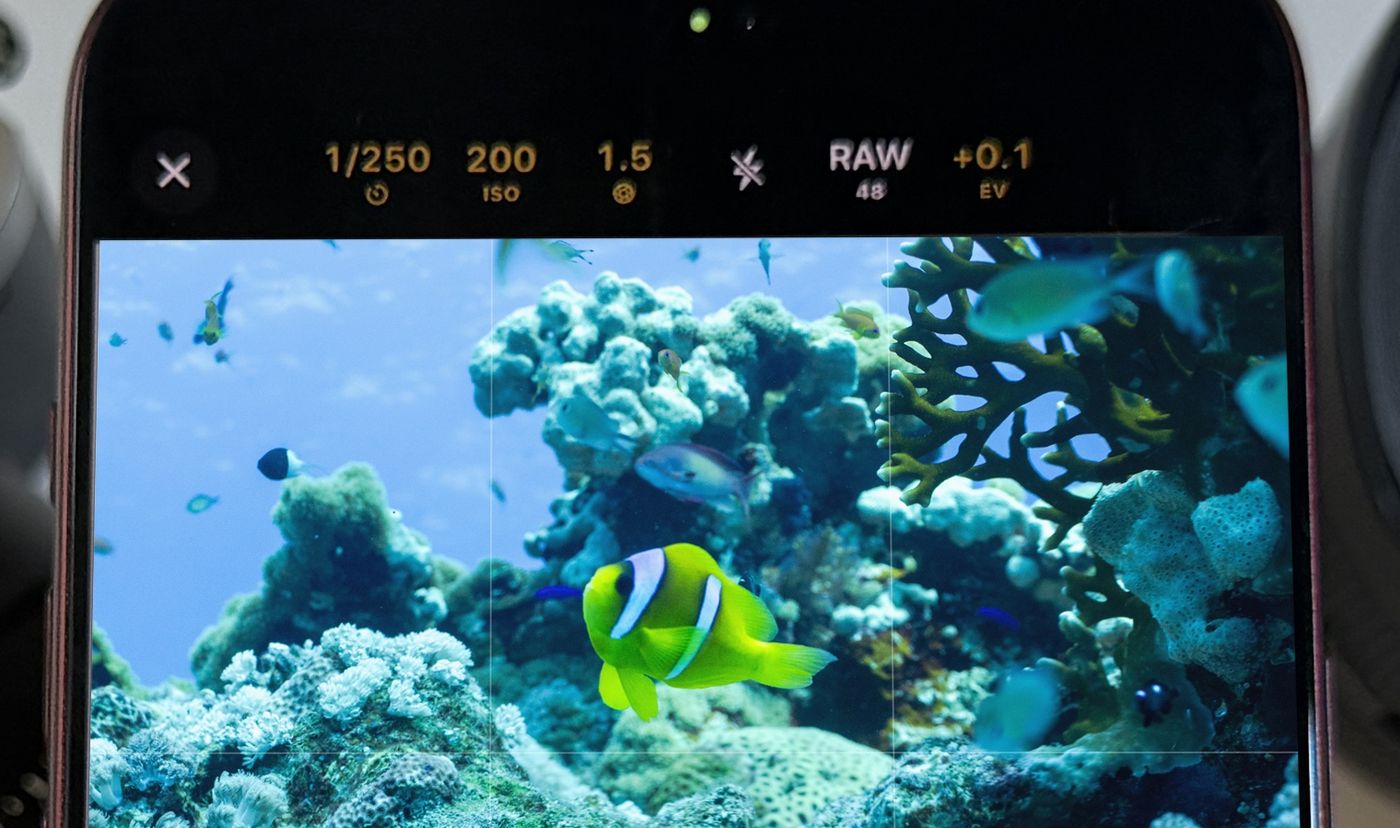
A full manual camera in Apple's familiar layout: manual ISO, shutter from 1/70000 s to 8 s, manual aperture, 48 MP RAW and open gate video on the iPhone 18 Pro Max. For the water, white balance presets for 0 to 6 m, 6 to 15 m, 15 m and deeper, green water and video lights, plus live True Colour in the viewfinder and six looks. It all runs on the phone, with no upload.
AquaColorFix
Best for: One-tap fixes after the dive
Turns blue-green casts into natural colour on photos and video with a single press. A correction tool rather than a camera.
DeepColors
Best for: Automatic correction of photos and video
Recovers the red light water absorbs and rebalances each colour channel. A correction tool rather than a camera.
Halide
Best for: Manual RAW from the surface and the shallows
A beautifully made manual camera for land that works well snorkelling. No underwater-specific colour tools.
Diving Standard is our app, so we're not neutral. We've described the others accurately; check each listing for current pricing.
What to look for
- Manual ISO, shutter and white balance. A touchscreen won't work through a housing, so you need to set your exposure on the boat and have it stay set. Apple's own camera keeps ISO automatic.
- White balance made for water. Auto white balance is tuned for land. Presets by depth get you most of the way in one step.
- Live colour in the viewfinder. If all you see is blue while you shoot, you're framing blind.
- Non-destructive edits. A corrected photo should keep its original. In Diving Standard, Revert in Photos brings it back.
- On-device processing. No upload, no waiting for signal on a boat.
You still need the hardware
No app makes a phone waterproof at depth. Beyond snorkelling, use a housing rated for the depth you'll dive, then let the app do the rest. New to this? Start with how to improve your underwater photos.
Shoot and fix underwater colour in one app
Manual controls, white balance for water and live True Colour. Download Diving Standard free for iPhone.
Download on the App StoreFrequently asked questions
What is the best underwater camera app for iPhone?
For shooting, Diving Standard's free camera: manual ISO, white balance tuned for water and live colour correction. For fixing finished photos and video, AquaColorFix and DeepColors are popular. Many people use a capture app and a correction app together.
Why do phones get underwater colour wrong?
Their auto white balance is designed for land. Underwater, red light disappears within a few metres and the camera takes the blue that's left as the real colour of the scene.
Does the iPhone camera work underwater?
Within its water resistance rating, briefly and in shallow water. For diving you need a housing, and the touchscreen won't work through it, so set your exposure before you get in.
Is there a free underwater camera app for iPhone?
Yes. Diving Standard includes a free camera with manual controls and True Colour underwater correction.