Underwater Photography
What Is Open Gate Video on iPhone?
Filmmakers love it for a reason. Open gate records the whole sensor instead of a cropped strip, so you can shoot once and frame for any screen later.
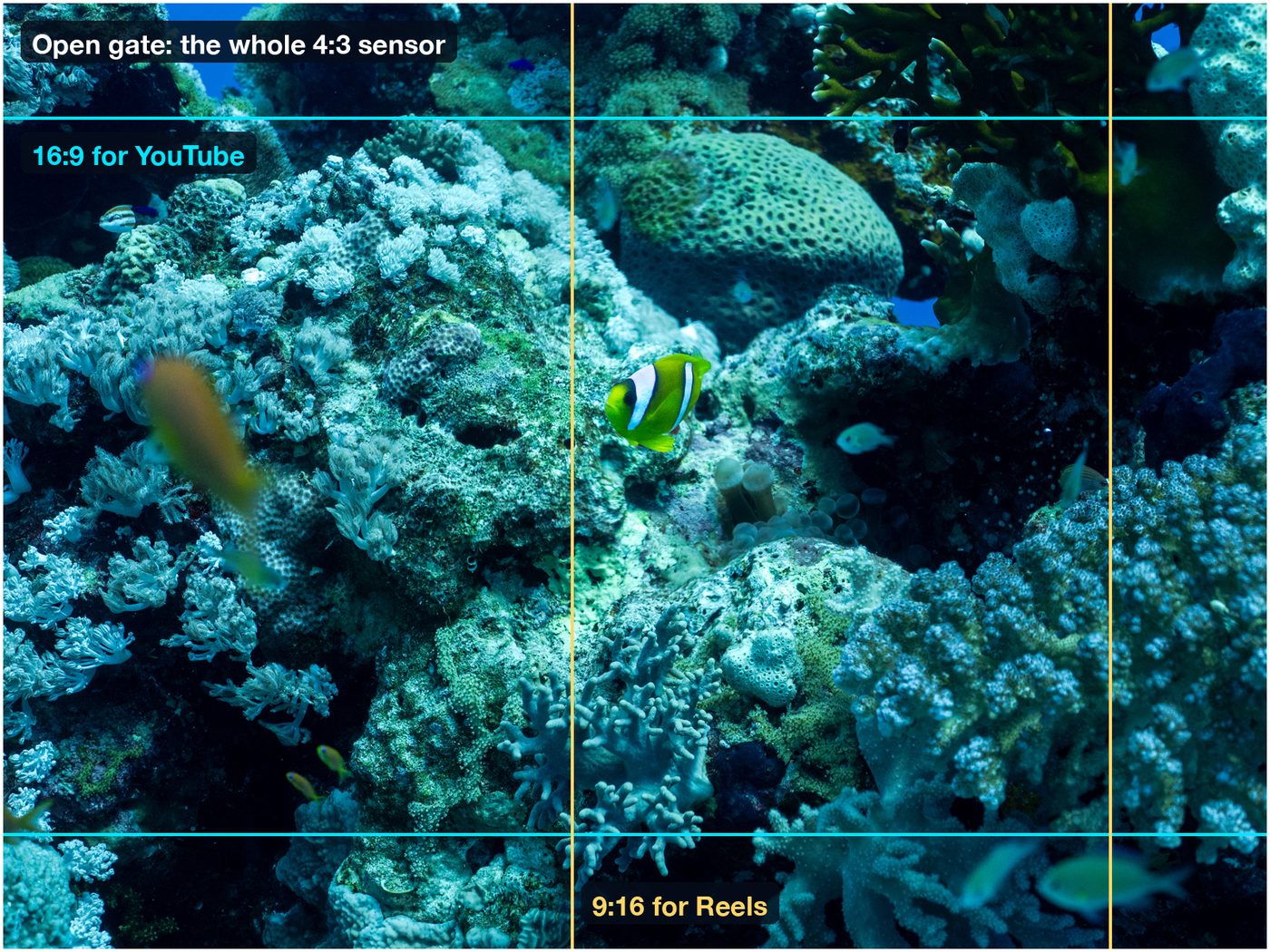
Open gate video records from the entire sensor instead of cropping it to a 16:9 window. You get a taller frame with more picture above and below, which you can cut to 16:9, 9:16 or 1:1 afterwards without zooming into a smaller crop. Filmmakers love it for that flexibility and for the tall, immersive frame it gives. Diving Standard's camera offers Open Gate as a video resolution on supported iPhones, alongside HD and 4K, with ProRes and Log.
- What
- Full-sensor video
- Gain
- Reframe for any screen
- Cost
- Bigger files
- In the app
- Video format: Open Gate
A phone sensor isn't 16:9. It's close to 4:3. Ordinary video throws away the top and bottom to make a widescreen picture. Open gate keeps them.
Why filmmakers love it
Part of it is practical, and part of it is feel. A taller frame is more immersive. It's the shape filmmakers chase with IMAX, and a big part of why Christopher Nolan shot The Odyssey on IMAX film cameras. Your phone won't turn you into Nolan, but open gate gives you a taste of that height, and the freedom to decide the final shape later.
- One clip, every format. Cut 16:9 for YouTube, 9:16 for Reels and Shorts, or 1:1 for a feed, from the same shot.
- Reframe after the fact. If a turtle drifted out of the centre, you can bring it back.
- Room to stabilise. Spare picture at the edges means a stabilising crop costs you nothing in the middle.
- Underwater, you can't always aim. Currents, a housing and a gloved hand rarely give you tidy framing. Open gate forgives it.
The trade-offs
| You gain | It costs |
|---|---|
| More picture and flexible crops | Larger files and more storage |
| Widescreen and vertical from one clip | A crop in your editor before you share |
| Works with ProRes and Log in Diving Standard | Not every iPhone and lens offers it |
How to shoot it in Diving Standard
- Open the camera and switch to Video: Open Camera from the Home screen in Diving Standard. The layout is the one you know from Apple's camera.
- Choose Open Gate as the resolution: In the format controls, pick Open Gate next to HD and 4K. If your iPhone or lens doesn't support it, the option is greyed out.
- Lock shutter and ISO: About double the frame rate for shutter, and a fixed ISO so brightness holds. Apple's own camera keeps ISO automatic.
- Frame loosely: Leave a little room around your subject. You'll crop later.
- Crop in the edit: Cut to your target shape in your editor, or run the clip through True Colour first to correct the water.
For the rest of the recipe, see how to improve your underwater videos.
Shoot open gate with manual control
Open gate, ProRes, Log, manual ISO and live True Colour. Free in Diving Standard for iPhone.
Download on the App StoreFrequently asked questions
What is open gate on iPhone?
Video recorded from the full sensor area rather than a cropped 16:9 window, so you get a taller frame to reframe later.
Why do filmmakers like open gate?
It records more picture than you need, so the final framing and aspect ratio can be chosen in the edit, and the taller frame feels more immersive.
Does open gate make video files bigger?
Yes. More pixels per frame means larger files, so keep an eye on storage.
Which iPhones support open gate?
It depends on the model and lens. In Diving Standard's camera, Open Gate appears only when your iPhone offers a matching format.
Is open gate good for underwater video?
Very. Housings and currents make precise framing hard, and open gate leaves room to recentre and crop.