Underwater Photography
Why Your Underwater Footage Looks Blue, and How to Fix It
The colour was there when you saw it. Here's where it went, and the three-step fix that brings it back on iPhone photos and video.
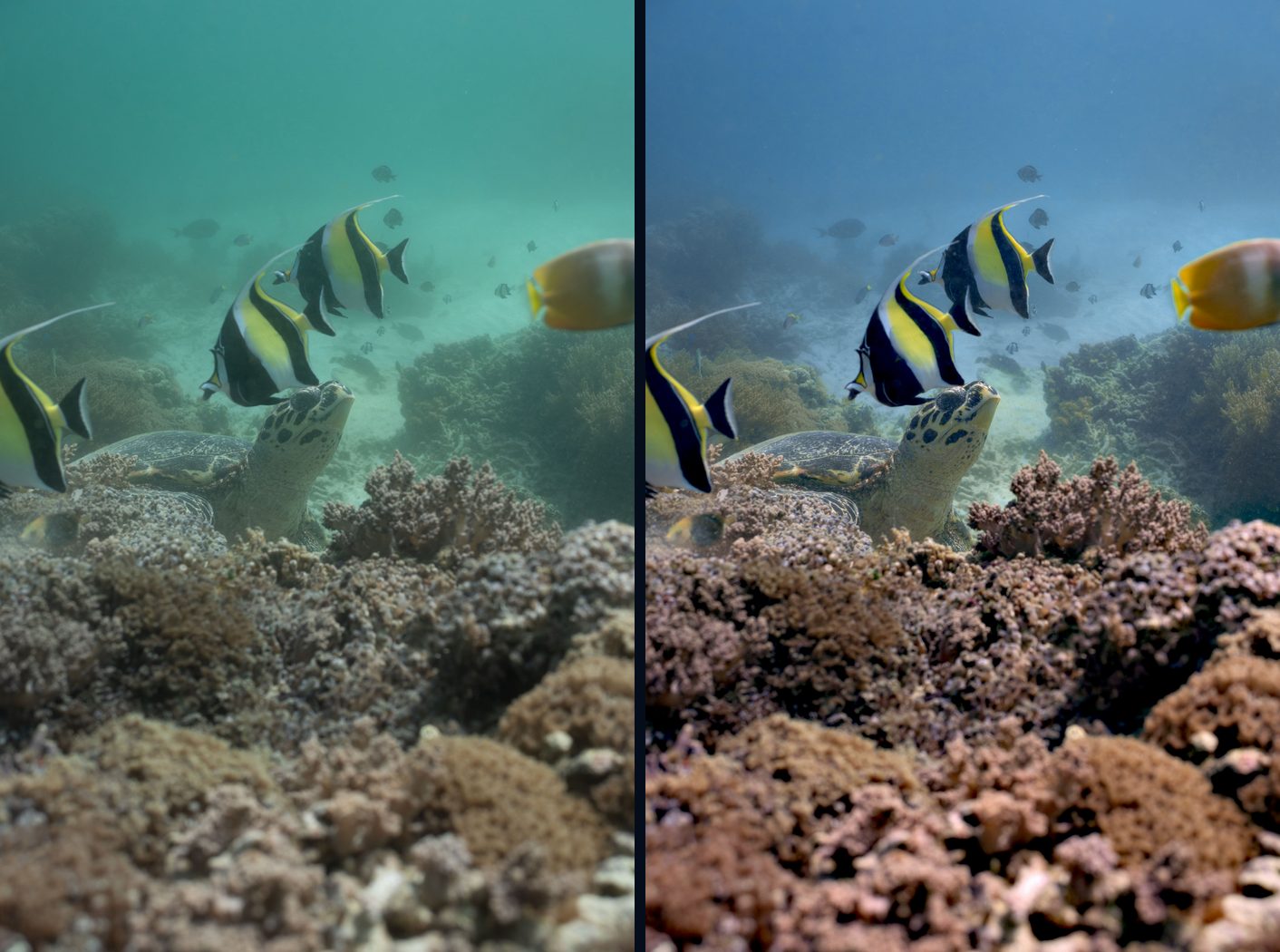
Underwater footage looks blue or green because water absorbs red light first: most red is gone by about 5 m, orange by 10 m and yellow by 20 m. Your phone makes it worse, because its white balance assumes you're on land. To fix it, add light when you shoot, set white balance for water and depth, then correct what's left. Diving Standard's True Colour does the last two on your iPhone, for photos and video, with no upload and no generative AI.
- Why
- Water absorbs red first
- Step 1
- Add light or get closer
- Step 2
- White balance for water
- Step 3
- Correct with True Colour
You came back from a beautiful dive and the footage looks like it was filmed through a swimming pool. The camera isn't broken, and you didn't imagine the colours. The water filtered them out on the way to the lens.
Why it happens
| Colour | Mostly gone by |
|---|---|
| Red | About 5 m |
| Orange | About 10 m |
| Yellow | About 20 m |
| Green | About 30 m |
| Blue | Last to go |
Then the phone joins in. Its auto white balance is built for land, so it sees all that blue, assumes it's the real colour of the scene and either leaves a cyan wash or overshoots into green. It can't add back light that isn't there, which is why the best results come from a good shot plus a fix made for water.
The three-step fix
- Bring the colour with you: The closer you are, the less water the light crosses. A video light or strobe held to one side puts the reds and oranges back into the foreground.
- Set white balance for water: In Diving Standard's camera, pick a preset for 0 to 6 m, 6 to 15 m, 15 m and deeper, green water or video lights. Or dial in Kelvin and tint, or set it from a grey card for an exact match.
- Correct what's left: True Colour restores red and balances the water on the phone. It works on photos and video, shows the corrected picture live in the camera, and keeps the original photo so you can Revert in Photos.
What True Colour does, and doesn't
- It runs on your phone. No upload and no generative model, so nothing in the picture is invented.
- It protects what should stay white. Highlights, sand and skin are guarded, so the fix doesn't turn them pink.
- You choose the look. True, Enhanced, Azure, Deep Blue, Cinematic and Pelagic, plus an 8-band HSL editor for fine-tuning.
- It can't create light. In very deep or murky water there's no red left to recover. That's when a light matters most.
Other good tools
AquaColorFix and DeepColors do a similar job after the dive. To fix it by hand: lower blue until the picture turns green, then lower green and nudge red up. For a side-by-side of the apps, see the best underwater camera apps for iPhone.
Bring the colour back, free
True Colour corrects underwater photos and video on your iPhone, live in the camera. Download Diving Standard.
Download on the App StoreFrequently asked questions
Why does underwater footage look blue?
Water absorbs red light within about 5 m, orange by about 10 m and yellow by about 20 m, leaving blue and green. Your phone's white balance, built for land, often makes it worse.
How do I fix blue underwater video on iPhone?
Add light when filming, set white balance for water and depth, then apply colour correction. Diving Standard's True Colour corrects video on the phone for free.
Does True Colour use AI?
It doesn't use a generative model or any online service. It's an on-device colour pipeline that restores red and balances the water.
Can I get the original back after correcting a photo?
Yes. A corrected photo keeps its original, so Revert in the Photos app brings the uncorrected file back.