Android
The Best Sea Conditions App for Divers on Android
Your dive computer starts working once you're in the water. The question before that is whether to get in at all. How to read the sea, and the apps that help.
The best dive conditions app for Android rates the sea for diving, not surfing. Diving Standard shows sea temperature, wind, swell, current, tide, sunrise and sunset for any site, with a verdict for scuba, freediving or snorkelling, the next good window and a home-screen widget. A 10-day sea forecast is a Premium feature. Visibility is an estimate, so confirm it with a local dive centre.
- Shows
- Temp, wind, swell, tide, current
- Verdict
- For your discipline
- Widget
- Android home screen
- Visibility
- An estimate
A weather app tells you whether to bring an umbrella. A diving conditions app has a harder question to answer: will the sea be diveable, comfortable and clear? A sunny day can still be a terrible day to dive.
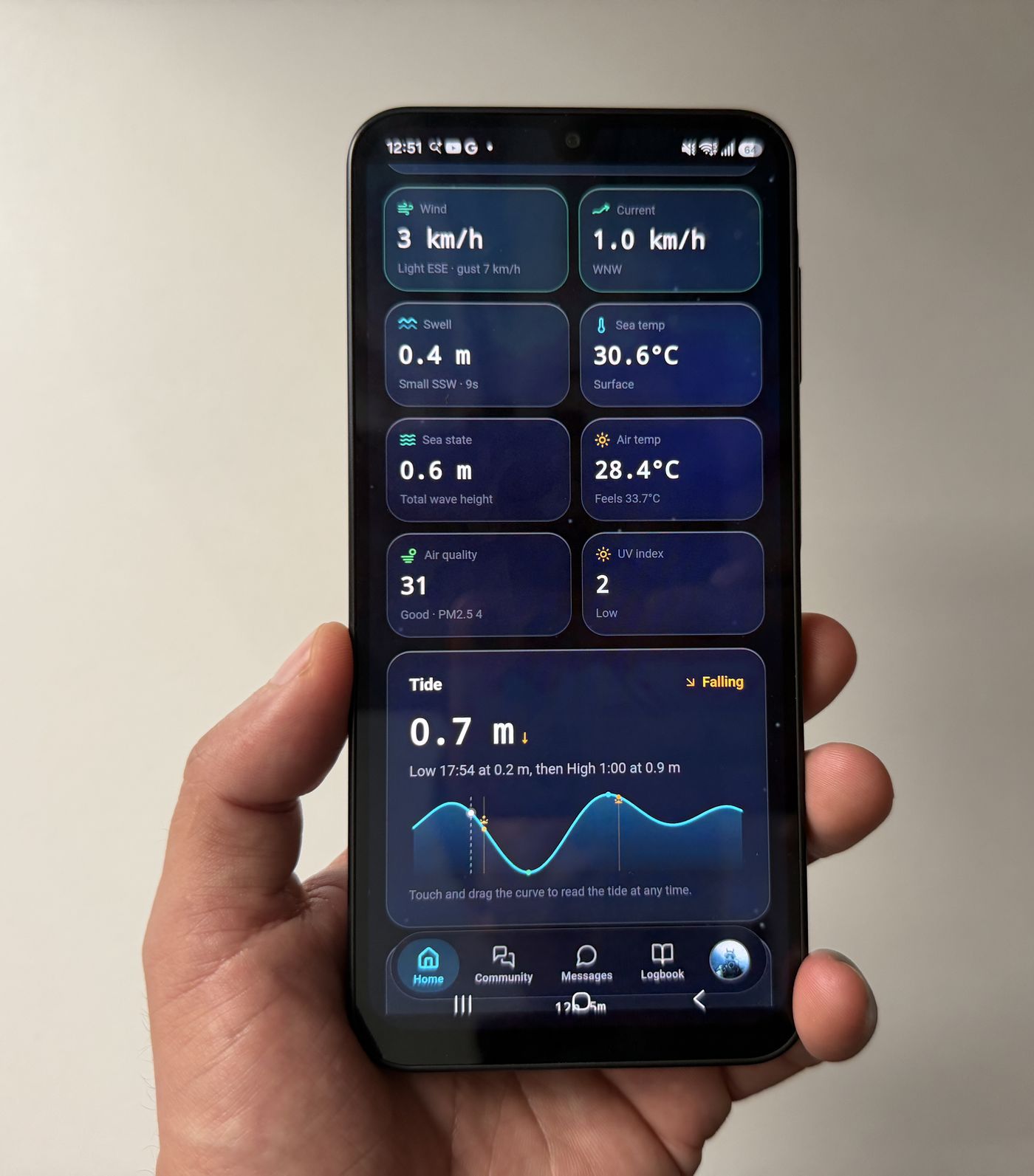
What to check, and why
| Number | Why it matters |
|---|---|
| Sea temperature | Decides your wetsuit and how long you stay comfortable |
| Wind | Onshore wind and strong gusts make entries rough and boat rides rougher |
| Swell | A big swell makes shore entries hard and stirs up the water |
| Tide | Slack water is the easy window at many sites; strong flow can sweep you off your plan |
| Current | How hard the water is moving |
| Sunrise and sunset | Light, not the tide, ends a lot of dive days |
What the app shows
- A verdict for your discipline. Scuba, freediving and snorkelling have different limits, so the sea is rated for the one you do, not with a generic surf score.
- A tide curve from a few hours ago to a day ahead, so you can plan inside the window.
- The next good window. When today is poor, you see when it improves, not just a no.
- A home-screen widget so the answer is there without opening the app.
- A 10-day sea forecast (Premium) that rates each day and finds its best window, with later days shown as a trend.
A fair warning about visibility: it's estimated from conditions, not measured, and it can be wrong. Treat it as a hint and check with someone who's been in the water today.
Other sources worth using
- The Viz App, where freedivers and snorkellers log the visibility they actually found.
- Local dive centres and operators, who know the site today.
- A marine forecast or tide app, for a second opinion on wind and swell.
A two-minute pre-dive routine
- Open conditions for your site: Read the verdict first, then the numbers.
- Check tide and wind together: Wind against tide can spoil an otherwise fine day.
- Pick your window: Early morning and slack water are often best.
- Confirm locally: Ask the dive centre or other divers what the water's doing now.
Read next: what is the best time to scuba dive? and types of ocean currents.
Check the sea before you splash
Tide, wind, swell, temperature and a diving verdict, with a widget on your home screen. Download Diving Standard from Google Play.
Get it on Google PlayFrequently asked questions
What is the best app for dive conditions on Android?
Diving Standard rates the sea for diving, with sea temperature, wind, swell, current, tide and the next good window, plus a home-screen widget on Android.
Can an app tell me the underwater visibility?
It can estimate it from conditions, but visibility isn't measured. Confirm with a local dive centre or a community report.
Is there a 10-day sea forecast for divers?
Yes. Diving Standard offers a 10-day sea forecast as a Premium feature, rating each day and showing its best window.
Are tide times enough to plan a dive?
Tide is one piece. Check wind, swell, current and temperature too, and confirm locally.